
AI Smart Card
AI Smart Card: Turn ChatGPT and Gemini Links Into Usable Notes
Save AI chat links with structure, not just URLs. LinkBook Smart Cards make it easier to verify, classify, and reuse what you save.
In this guide
- Why AI chat links are easy to collect but hard to reuse.
- How ChatGPT Source Pack and Gemini Insight Pack differ.
- A repeatable workflow for notes, tags, and source checks.
- Best practices to keep AI research practical and verifiable.
You save a ChatGPT or Gemini link because it feels valuable: a reading list, a sourced explainer, a draft outline. Then later arrives and the link is just a URL.
To reuse it, you have to reopen the full conversation to answer basic questions:
- What was the prompt and what did the assistant actually say?
- Can I pull the ChatGPT source links into my notes without hunting through the chat?
- Which domains did it rely on, and do I trust them?
- Was there an image or other asset I need to keep?
That is the core problem with saving AI chat links: they are easy to collect, but hard to verify and reuse. A plain bookmark cannot give you structure, context, or next-step actions.
LinkBook's answer is simple: save the link, then let an AI smart card turn it into something you can act on.
Try LinkBook on iPhone
Install in 30 seconds, save your first link from Share Sheet, and see Smart Cards immediately.

What Smart Cards are in LinkBook
LinkBook saves links and enriches them with Smart Cards. Smart Cards turn raw links into structured, actionable summaries.
A Smart Card is a structured overlay for a saved URL. Instead of treating every link the same, LinkBook pulls out the details you usually want after saving:
- A preview that explains what the link contains.
- Key elements such as sources, tags, metadata, and assets.
- Quick actions that match the content, like copy, open, and save to notes.
Smart Cards work across many link types, but this post focuses on the category that gets messy fast: AI conversation links.
Deep dive: ChatGPT Smart Card (ChatGPT Source Pack)
When you save a ChatGPT shared link in LinkBook, you can get a Smart Card called ChatGPT Source Pack. The job of this card is to turn a chat into a source-first reference, so you can verify and export citations without re-reading everything.
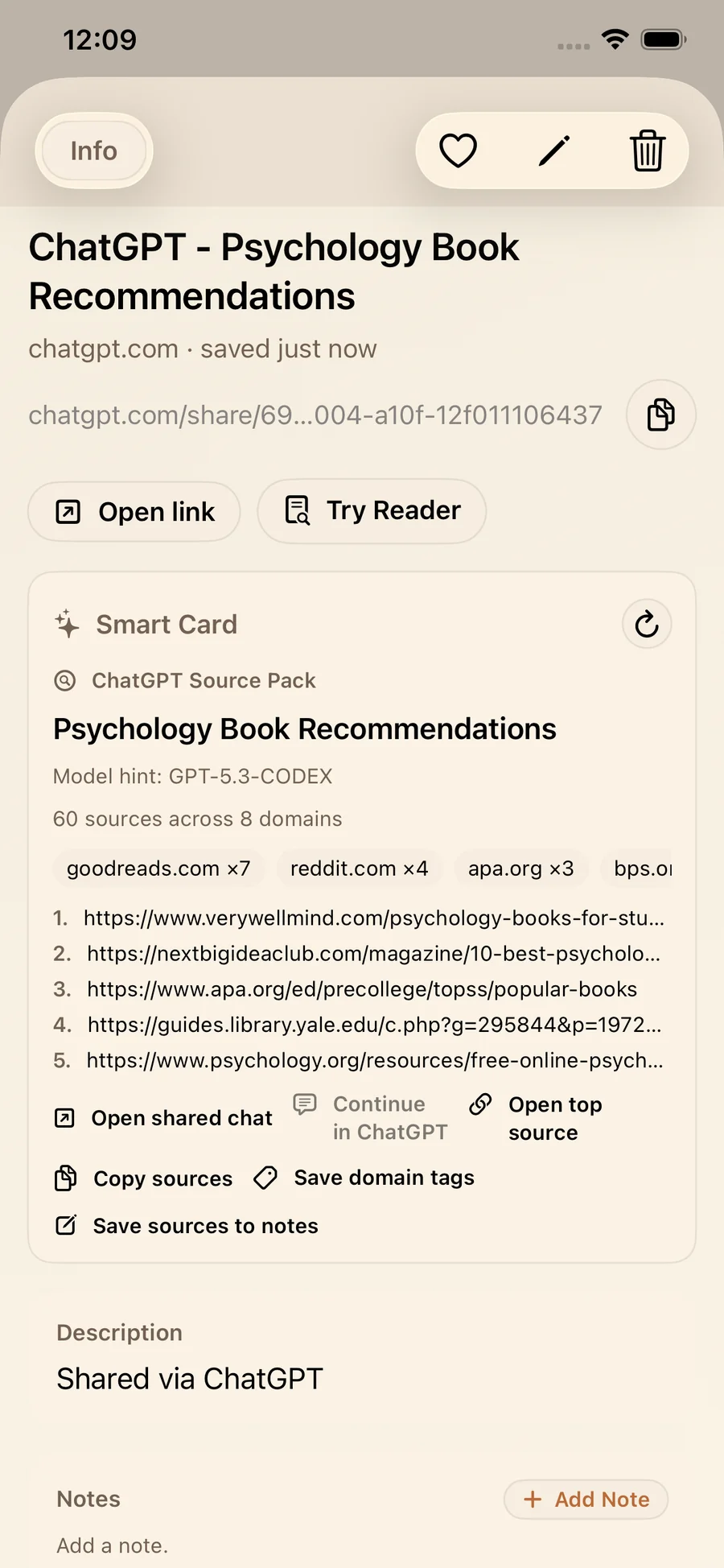
What ChatGPT Source Pack surfaces
- Source links: a clean list of referenced URLs.
- Top domains: a quick domain mix view for fast credibility checks.
- Model hint when available: useful when comparing outputs over time.
Quick actions you will actually use
Typical actions in ChatGPT Source Pack include:
- Open shared chat.
- Continue in ChatGPT when available.
- Open top source.
- Copy sources.
- Save domain tags.
- Save sources to notes.
Practical example: reading lists you can cite
If ChatGPT gives you a sourced reading list, ChatGPT Source Pack helps you check domain mix, copy citations, and save sources into a note where you add your own comments like read next, use for intro, or needs verification.
Deep dive: Gemini Smart Card (Gemini Insight Pack)
Gemini links often follow a different pattern: prompt, answer, referenced links, and sometimes a generated image. LinkBook's Smart Card for that format is Gemini Insight Pack.
This card is optimized for recall: it turns a saved Gemini chat into a scan-friendly brief, while keeping sources and assets close.
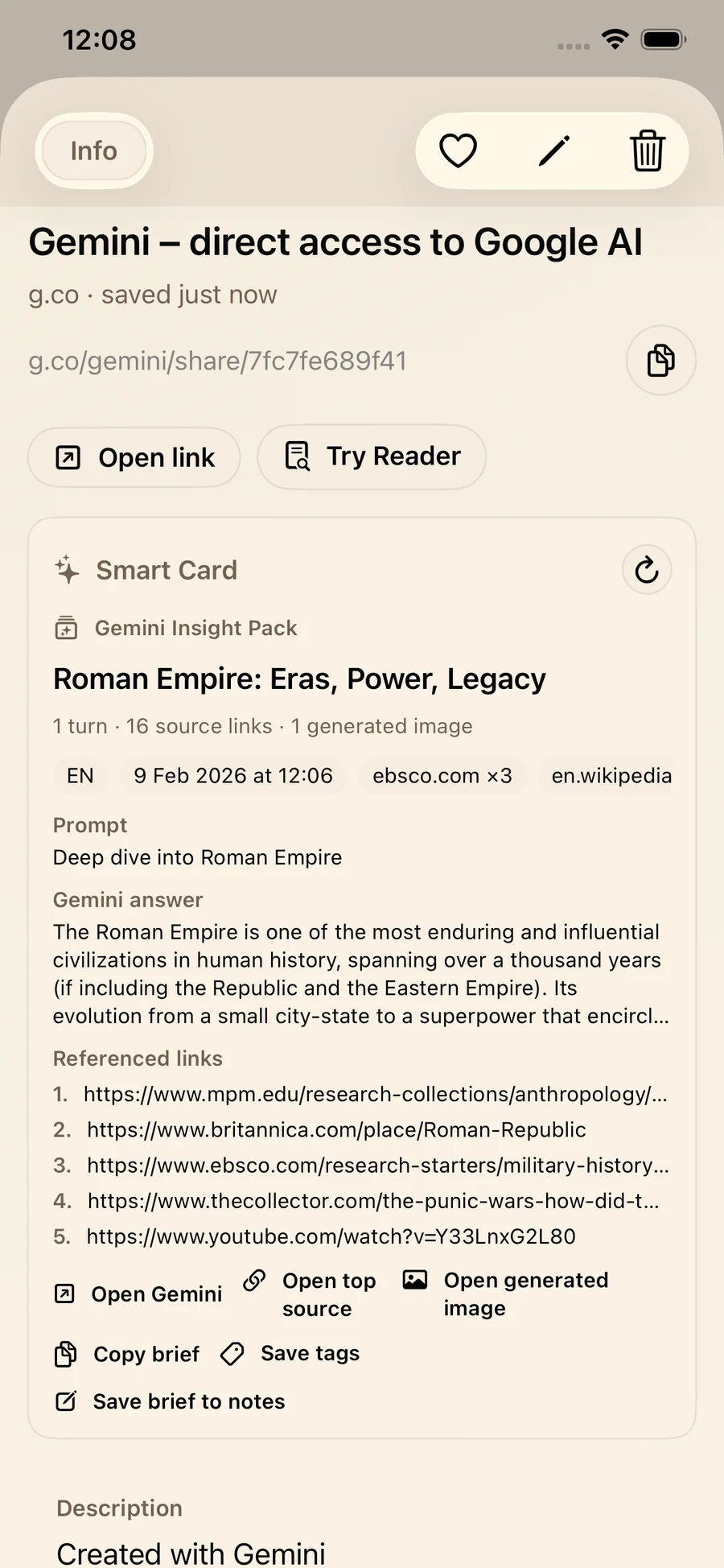
What Gemini Insight Pack surfaces
- Turn count and source link count for quick depth checks.
- Prompt and answer preview to remember why you saved it.
- Generated images when present, with direct open actions.
- Top domains and tags for lightweight classification.
Quick actions built for briefs
Typical actions in Gemini Insight Pack include:
- Open Gemini.
- Open top source.
- Open generated image when included.
- Copy brief.
- Save tags.
- Save brief to notes.
Practical example: from good answer to reusable outline
With a topic explainer, you can copy the brief into an outline, open a top source to verify a claim, and save the brief to notes so your next session starts with context instead of a blank page.
ChatGPT Source Pack vs. Gemini Insight Pack
Both cards help you save AI chats, but they are strongest in different moments:
- ChatGPT Source Pack is strongest when you want citations and domains first.
- Gemini Insight Pack is strongest when you want prompt-and-answer recall plus sources and assets.
A simple way to choose:
- If your next step is cite, verify, or compile references, start with ChatGPT Source Pack.
- If your next step is summarize, outline, or reuse structure, start with Gemini Insight Pack.
Practical workflow: a repeatable AI research workflow in LinkBook
1) Save the keeper link immediately
Save when the answer is fresh and you still remember why it matters.
2) Scan the Smart Card before reopening the full chat
- On ChatGPT links, skim top domains and the source list.
- On Gemini links, skim the prompt and answer preview, then source count.
3) Convert structure into notes and tags
For ChatGPT links:
- Copy sources into your document or reference list.
- Save sources to notes to create an annotated reading queue.
- Save domain tags to build filters like journals, orgs, or publishers.
For Gemini links:
- Copy brief into an outline or draft.
- Save brief to notes for an editable project page.
- Save tags so you can retrieve by topic or project.
4) Verify at least one source before you rely on it
Smart Cards make verification easier, but you still have to do it. Tap Open top source and confirm the claim matches the reference.
Over time, this becomes a library of notes, sources, and tagged briefs, the kind of system you want from a knowledge management app.
Who should use this?
Smart Cards for AI chats are most useful when you plan to revisit what you save:
- Students collecting study explainers and citation-ready reading lists.
- Researchers organizing sources alongside summaries and prompts.
- Creators and writers building briefs, outlines, and reference stacks.
- Teams saving prompt experiments, drafts, and research threads for later reuse.
Limitations and best practices
Limitations
- No sources in the chat means no sources to extract.
- Domain mix is a signal, not a full credibility verdict.
- Some actions depend on the shared link and are not always available.
- Generated images appear only when the conversation includes them.
Best practices
- Add one line of context in your note, such as use for chapter 4 or verify dates.
- Tag by intent, like to cite, to read, or to outline, not only by topic.
- Open at least one reference before you share, publish, or submit work.
Why this matters for students, researchers, and creators
AI is fast at generating text. The hard part is everything that comes after: verification, retrieval, and reuse.
An AI smart card turns an AI chat link into a structured object:
- sources you can export,
- a brief you can scan,
- tags you can filter,
- and notes you can build on.
Save your next AI chat like you will need it later
Next time you get a response worth keeping, save the shared link in LinkBook. Let the Smart Card do the first pass, then turn the useful parts into notes, tags, and sources you can trust and reuse.
If you want your AI conversations to become a personal research library instead of a pile of bookmarks, start with one saved chat today on the App Store.
FAQ
How do I save ChatGPT source links for citations later?
Save the shared ChatGPT link in LinkBook and open the ChatGPT Source Pack. Use Copy sources to export the citation list, or Save sources to notes to turn them into an annotated reading list you can reuse in papers and projects.
What is the Gemini insight pack in LinkBook?
Gemini Insight Pack is LinkBook's Smart Card for Gemini conversation links. It surfaces the prompt and answer preview, turn count, referenced links, and any generated image when present, plus actions like Copy brief and Save brief to notes.
What is a simple AI research workflow that keeps things verifiable?
Save AI chats in LinkBook immediately, scan the Smart Card for sources and context, convert useful pieces into notes and tags, and open at least one source to verify key claims before you rely on them.
Ready to build your link library?
Download LinkBook and start saving in seconds.