
Airbnb Smart Card
Airbnb smart card: Turn saved listings into booking-ready decisions in LinkBook
Save Airbnb listings with context, not memory. LinkBook turns saved listings into structured cards for faster comparison, safer booking checks, and better final decisions.
In this guide
- Why regular bookmarks break down during trip planning.
- What Airbnb Smart Card extracts and highlights automatically.
- How Missing critical info reduces booking surprises.
- How to compare saved stays and decide faster on iOS.
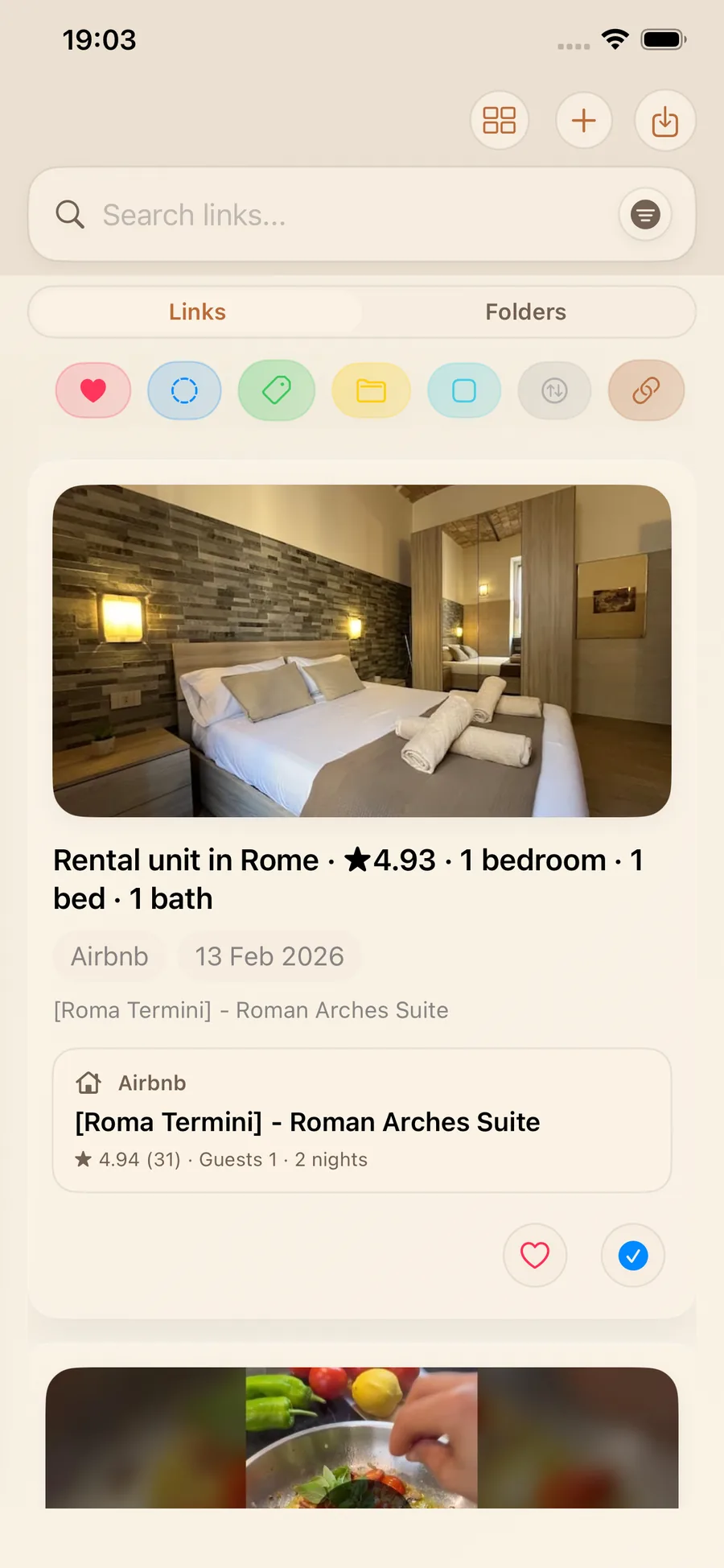
When you are planning a trip, you do not really save links. You save options. Smart Cards are structured summaries for saved links: they pull out the details you need later and present them in a scannable format. In LinkBook, the Airbnb smart card applies that idea to Airbnb listings so you can review stays quickly, compare options, and spot missing booking details before you commit.
Travel research is messy by default: tabs, screenshots, and half-remembered "that one place near Termini." Smart Cards make your saved list feel like an actual shortlist, especially when you are collecting links across days or weeks of planning.
Try LinkBook on iPhone
Install in 30 seconds, save your first link from Share Sheet, and see Smart Cards immediately.

Why regular bookmarks fail for travel decisions
A bookmark remembers where something is, not why you saved it. For travel, that gap creates friction:
- You forget the basics: beds vs bedrooms, guest capacity, and bathroom count.
- Context disappears: which dates, how many nights, and how many adults.
- Critical info is buried: price, cancellation terms, and key amenities.
- Comparisons are manual when trying to compare Airbnb stays across multiple links.
In practice, this turns trip planning into re-open everything work. You tap into the same listings repeatedly just to re-check essentials, which is slow and increases the odds you miss something important.
The Airbnb research pain points and where booking risk sneaks in
Airbnb is excellent for discovery, but decision-making gets harder when you are juggling many listings.
- Key fields are not always visible in previews.
- You are comparing multiple variables at once: location, type, amenities, and social proof.
- Dynamic details create surprises, especially around dates or policy terms.
- Small signals like Superhost and Guest favorite badges are easy to forget.
That is why "I will just bookmark it" becomes unreliable. You do not just need a saved link. You need clear Airbnb details you can trust at decision time.
Airbnb smart card capability in LinkBook
LinkBook Smart Cards surface decision-critical details from an Airbnb link in one place. It is a smart card for Airbnb listings built for iOS trip planning.
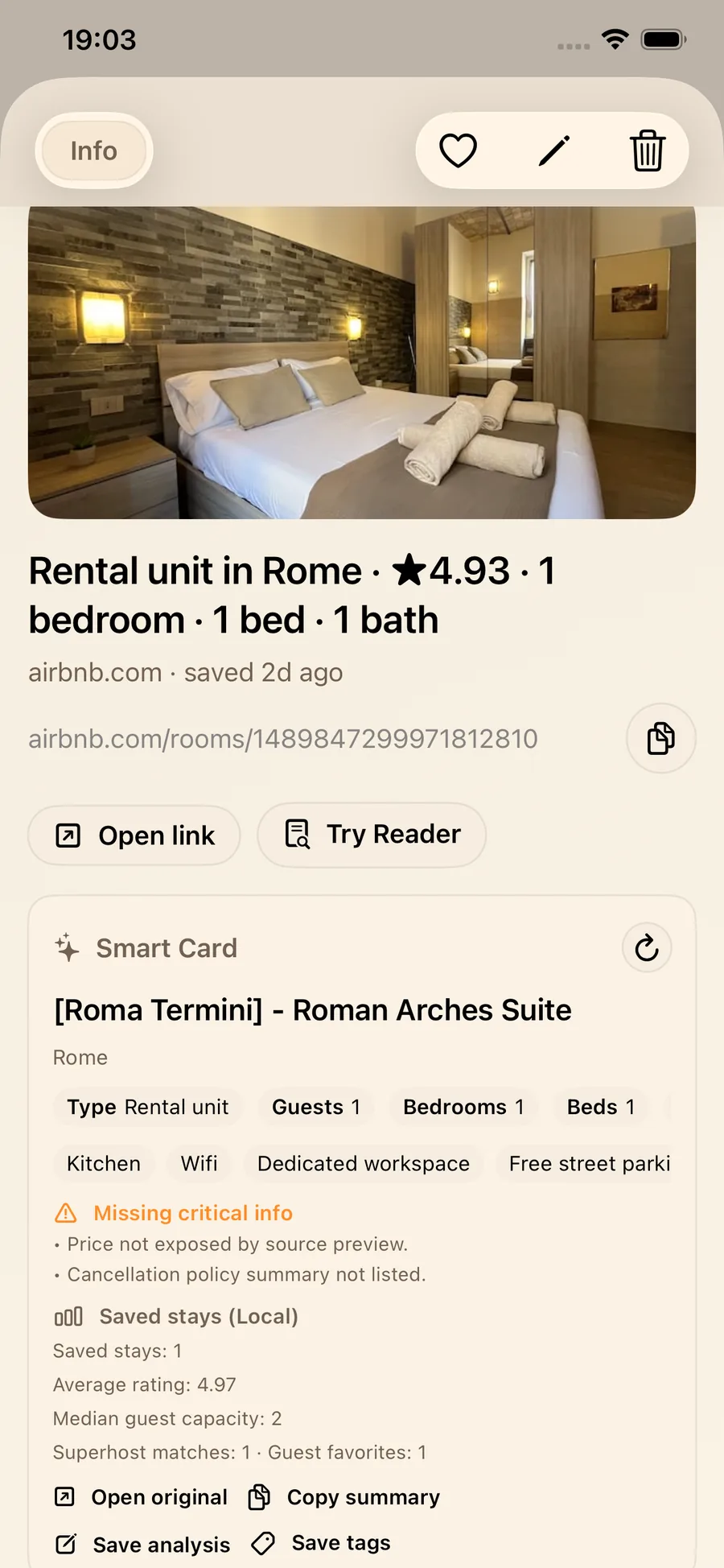
When you save a listing, the Airbnb Smart Card can extract and display:
- Title and location.
- Type, guests, bedrooms, beds, and baths.
- Rating and review count when available.
- Superhost and Guest favorite badges.
- Amenities.
- Cancellation summary.
- Stay window: check-in/check-out, nights, adults.
- Price: amount, currency, and interval when available.
If you are comparing a handful of options, this is the difference between "I have links" and "I have a shortlist." You can scan core facts without reopening Airbnb every time.
Missing critical info makes gaps obvious
If Airbnb preview data does not expose a field, the card does not guess. It flags the gap under Missing critical info, including:
- Price not exposed by source preview.
- Guest capacity not listed.
- Rating not listed.
- Cancellation policy summary not listed.
- Room type not listed.
This turns the card into a practical Airbnb booking decision tool. You know exactly what to verify before booking and can jump back to the original listing when needed.
Local comparison: Saved stays (Local)
Each Airbnb Smart Card includes a local comparison block that summarizes your saved stays:
- Saved stays count.
- Average rating.
- Median guest capacity.
- Superhost matches and Guest favorites count.
It is a lightweight superhost and guest favorite comparison that helps you evaluate a new option against your existing shortlist.
Actions you can take immediately
Inside the card you can:
- Open original.
- Copy summary.
- Save analysis.
- Save tags.
How the workflow works in the iOS app
LinkBook keeps the workflow simple:
- Save the Airbnb link from iOS Share Sheet or copy-paste.
- LinkBook turns the listing into a card you can scan at a glance.
- Compare using your Saved stays (Local) snapshot.
- Act: open original, copy summary, or tag and organize.
A practical example: save 8-10 listings, tag them by neighborhood, then use cards to narrow down to three finalists. Copy each summary and share with your travel partner without extra screenshots.
Why the card stays useful across different listings
Airbnb pages vary by device, region, and link format. LinkBook is designed to keep the saved card useful across those variations:
- It pulls in the clearest listing details the page makes available.
- It keeps the saved listing attached to a clean, consistent link.
- It can keep trip details like dates and guest count when the link includes them.
- It can show price and stay details when the listing exposes them.
Real decision value: speed, clarity, confidence
The Airbnb Smart Card shortens the "open 10 tabs, re-check everything" loop. Used consistently, LinkBook becomes an Airbnb trip planning tool that lives alongside links you already save.
- Speed: scan essentials and eliminate mismatches fast.
- Clarity: get price and cancellation summaries when available, plus explicit warnings when missing.
- Confidence: make choices you can explain and share with one-tap summaries.
If you want a quick habit that reduces booking risk, run this checklist before booking:
- Do stay basics match your group: guests, beds, baths?
- Are price and cancellation visible, or will you verify them now?
- Does rating and review count meet your comfort level?
- Are amenities aligned with your non-negotiables?
Because LinkBook is a local-first travel planning app, your saved stays and comparisons are designed to stay fast and focused.
FAQ
What is an Airbnb smart card?
An Airbnb smart card is a structured summary of a saved Airbnb listing. It surfaces key fields like location, capacity, ratings, amenities, and policy or price signals when available so you can review and compare stays inside LinkBook.
How does LinkBook create a smart card for Airbnb listings?
When you save an Airbnb listing, LinkBook gathers the most useful stay details it can find, such as listing basics, trip context, and pricing or policy cues when available, then turns them into a cleaner card for review.
Can I compare Airbnb stays in the app?
Yes. Each card includes a Saved stays (Local) block with saved stays count, average rating, median guest capacity, and Superhost or Guest favorite totals so you can compare options against your own shortlist.
Will it always show price and cancellation details?
Not always. If source preview data does not expose those fields, the card flags them under Missing critical info. When available, it can show price, currency, interval, and a cancellation summary.
Conclusion
Smart Cards turn saved links into structured summaries you can actually use. For travel, the Airbnb Smart Card in LinkBook helps you move from "saved" to "booked" with fewer surprises.
Try it on your next trip. Smart Cards are a premium feature with a free cap, and Premium unlocks unlimited Smart Cards for full shortlist planning.
Download LinkBook on the App Store and explore how Smart Cards work in LinkBook.
Ready to build your link library?
Download LinkBook and start saving in seconds.