
ChatGPT Source Pack
ChatGPT Smart Card: Save Shared Chats With Sources, Prompt Preview, and Notes
ChatGPT links often save the conversation but lose the workflow. LinkBook's upgraded ChatGPT Smart Card turns a public shared chat into a Source Pack you can scan, verify, tag, and reuse without digging back through the full conversation every time.
In this guide
- Why shared ChatGPT URLs are hard to reuse later.
- What the upgraded ChatGPT Source Pack surfaces at a glance.
- How source export, domain tags, and quick actions change the workflow.
- Which public ChatGPT share links are supported.
The problem: a saved ChatGPT link rarely tells you enough later
You save a ChatGPT link because something inside it matters: a research prompt, a source list, a useful answer, a comparison, a buying guide. Then later you reopen it and have to reconstruct the basics.
- What was the original prompt?
- Which answer was worth saving?
- Did the chat cite real sources, and which domains showed up most?
- Can you turn those sources into notes or tags without manually copying everything?
A plain bookmark stores the URL, not the context. That is exactly where LinkBook's upgraded ChatGPT Smart Card fits: it turns a saved shared chat into something reusable.
Try LinkBook on iPhone
Install in 30 seconds, save a public ChatGPT share link, and see the upgraded Smart Card immediately.

The upgrade: a richer ChatGPT Source Pack, not just a saved AI link
Save a supported public ChatGPT share link into LinkBook and the app can build a ChatGPT Source Pack around it. Instead of forcing you to reopen the full chat to understand what you saved, the smart card pulls key parts into one structured view.
- Shared chat title.
- Source count and domain count.
- Model hint when LinkBook can detect it.
- Prompt preview and answer preview.
- Top domains and direct source links.
- Actions for opening, exporting, tagging, and note-taking.
The upgraded card also works across more than one public share-link format. LinkBook supports multiple ChatGPT share-link shapes, including standard share URLs, share-entry URLs, and short share URLs, while keeping private conversation URLs out of this public smart-card flow.
What you can understand in seconds from the upgraded card
The fastest win is that the card tells you what the chat was about before you commit to reopening the whole thing.
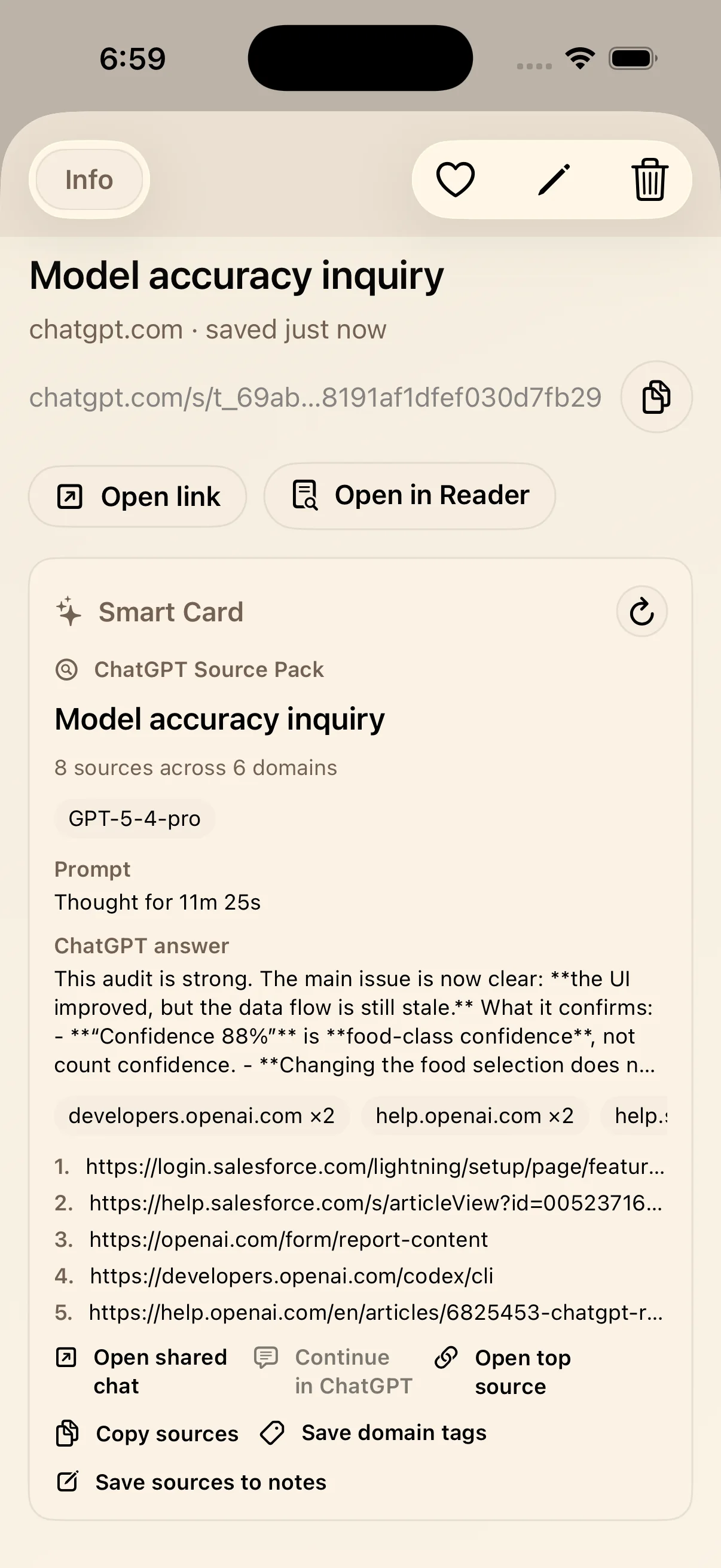
In one screen, you can scan the chat title, see how many external sources were detected, spot which domains were referenced most, check the model chip when available, and read enough of the prompt and answer to know whether the link is still relevant.
That makes shared AI chats much easier to triage. You do not have to remember why you saved the link because the card reintroduces the missing context right away.
What you can do next without rebuilding the chat by hand
The second upgrade is workflow. The card is not just a preview layer. It includes actions that turn a saved shared chat into something you can use in research, planning, writing, or shopping.
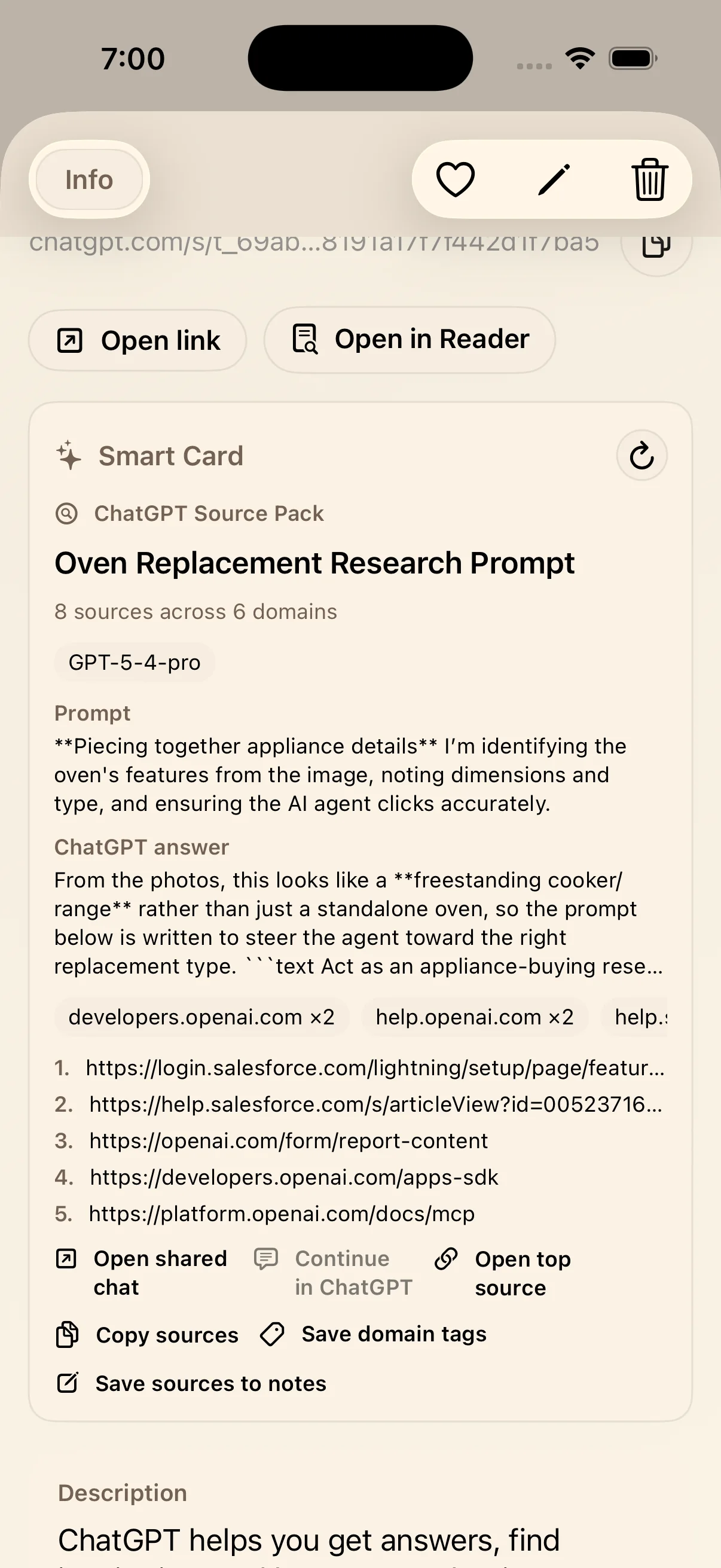
From the Source Pack, you can:
- Open the shared chat directly.
- Continue in ChatGPT when the shared page exposes a continue link.
- Open the top detected source.
- Copy the source list.
- Save domain tags from the detected source domains.
- Save sources to notes for a reusable reading list.
This is the practical difference between "I bookmarked a chat" and "I saved something I can actually work with."
Why this matters for real AI workflows
Research becomes easier to verify
When sources are pulled forward into the card, it becomes much easier to check whether a shared answer is backed by real references instead of treating the whole chat as a black box.
Better saves with less reopening
Prompt preview and answer preview let you judge value faster. You spend less time reloading old chats just to figure out what they were.
Notes and tags become one tap, not cleanup work
Exporting sources and saving domain tags means a useful ChatGPT answer can move into your own system instead of staying trapped inside a shared page.
Which ChatGPT links work with the upgraded Smart Card
LinkBook's ChatGPT Smart Card is built for public/shared ChatGPT pages, not private chats. In practical terms:
- Supported: public share links such as `/share/...`, `/share/e/...`, and `/s/...`.
- Not supported in this flow: private ChatGPT conversation URLs such as `/c/...`.
- When a supported page is missing or deleted, LinkBook treats it as unavailable instead of pretending it is still valid.
That keeps the Smart Card focused on shared pages you can actually reopen and reuse.
Ready to save shared ChatGPT links with context?
The next time a public ChatGPT share page is worth keeping, use this workflow:
- Save the shared ChatGPT link into LinkBook.
- Open the ChatGPT Source Pack.
- Scan the prompt, answer, model hint, and source domains.
- Copy sources, save domain tags, or save sources to notes.
If you save ChatGPT links for research, product work, or planning, the upgraded Source Pack makes those saves far more reusable. Try LinkBook on the App Store and continue with the broader AI Smart Card overview or AI Bookmark Manager for the bigger knowledge workflow.
FAQ
How do I save a ChatGPT shared chat on iPhone?
Save the public ChatGPT share link into LinkBook. When the link matches a supported shared-chat format, LinkBook can turn it into a ChatGPT Source Pack with prompt preview, answer preview, and source actions.
What does the ChatGPT Smart Card show?
It can show the shared chat title, source count, domain count, model hint when detected, prompt preview, answer preview, top source domains, and direct source links plus actions like Copy sources, Save domain tags, and Save sources to notes.
Can I export ChatGPT sources into notes?
Yes. The ChatGPT Source Pack includes Copy sources and Save sources to notes so you can move cited links into something reusable without manually rebuilding the list.
Does LinkBook support older or alternate ChatGPT share links?
Yes. The upgraded smart-card flow supports multiple public share-link formats, including standard share links, share-entry links, and short share links.
Does the ChatGPT Smart Card work with private ChatGPT conversations?
No. The smart card is designed for public/shared ChatGPT pages, not private conversation URLs.
Ready to build your link library?
Download LinkBook and start saving in seconds.