
Claude Recipe Smart Card
Claude Recipe Smart Card: Save Shared Claude Recipe Links on iPhone
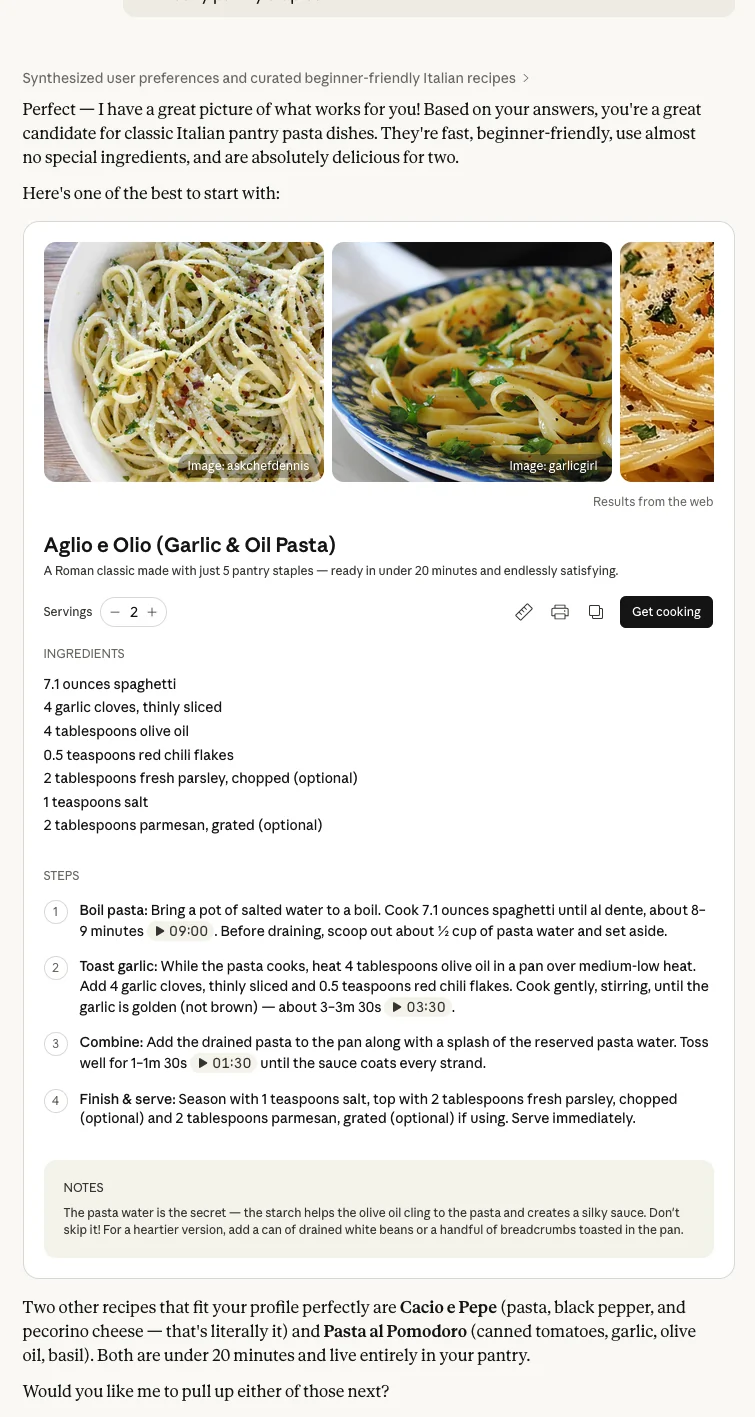
LinkBook already saves links as a library, not a loose pile of tabs. In version 2.8.2, supported Claude shared recipe links can go one step further: instead of staying a raw shared chat, they can open as a structured recipe smart card with ingredients, steps, checklist actions, and Cook Mode.
Availability: as of March 10, 2026, LinkBook version 2.8.2 has been submitted to Apple App Review and is awaiting approval. This update is not live on the App Store yet.
In this guide
- What LinkBook is adding for Claude shared recipe links in version 2.8.2.
- How the Claude recipe flow fits into LinkBook’s existing Smart Card system.
- What the interactive recipe card can do when a Claude share has enough structure.
- What to expect on different Claude shared pages.
What LinkBook is adding in version 2.8.2
LinkBook is an iPhone app for saving links and turning supported saves into smarter, more useful cards. Claude recipe support in version 2.8.2 is built into the same Smart Card system, not as a separate importer.
The app already recognizes public Claude share URLs. In 2.8.2, if the saved Claude share exposes enough recipe structure, LinkBook can promote that save from a normal Claude smart card into a recipe-oriented view.
- The saved link stays attached to the original Claude shared page.
- The smart card can surface a recipe name, ingredients, and steps in a cleaner format.
- When present in the Claude share, the card can also show prompt preview, servings, timings, and source count.
- If the recipe structure is not clear enough, the save can remain a regular Claude smart card instead.
How to save a Claude shared recipe link in LinkBook
The user-facing flow is simple because LinkBook keeps Claude recipe support inside the normal save flow.
- Open a public Claude shared link.
- Use the iPhone share sheet or copy the link.
- Save that Claude URL into LinkBook.
- Open the saved item in your library.
- If the shared page resolves as a supported recipe, LinkBook shows the Claude Recipe smart card.
After you save the Claude link, LinkBook checks whether the shared page includes enough recipe detail. If it does, the save opens as a Claude Recipe card. If not, it stays a regular Claude card.
What the Claude Recipe smart card can show
The main value is straightforward: you save a Claude recipe share and get something easier to cook from than a long shared chat page.
- A recipe title instead of only a generic saved Claude link.
- An ingredient list you can scan before shopping or prepping.
- A step list you can follow without re-reading the full conversation.
- Optional quick facts such as prep time, cook time, total time, servings, and source count when available.
- A prompt preview from the Claude share when LinkBook captures it.
- A model hint chip when the shared page exposes one.
That is the point of LinkBook smart cards in general: keep the saved source, but surface the part you will actually need later. If you want the broader product context behind this UI, see Recipe Smart Card.
Interactive recipe behavior inside LinkBook
This is not just a static preview. When a Claude share resolves into the recipe view, the card can behave like a working recipe tool inside your library.
- Ingredients and steps can be checked and unchecked like a checklist.
- Longer ingredient and step lists can expand past the default preview.
- Cook Mode opens a full-screen, step-by-step recipe flow.
- You can copy the recipe text, save recipe tags, save the recipe into notes, and open the original shared chat.
In plain English, LinkBook takes a Claude recipe share and turns it into something closer to a usable kitchen workflow than a saved chat transcript.
Why this is more useful than saving the raw Claude link
A raw shared chat is good for provenance. It is not always good for cooking. Ingredients may be buried in the answer, steps may be mixed with commentary, and a week later you may remember the dish but not where the actual recipe begins.
LinkBook keeps the original Claude share available, but it can also reshape the useful part into a cleaner card. That means the save is better for planning, shopping, cooking, and finding again later inside the same library.
- You do not have to re-scan the whole shared answer to find the ingredient list.
- You can work through steps and checklist items directly from the saved result.
- You can keep the recipe organized with notes and tags instead of losing it in a folder of generic AI links.
What to expect across different Claude shared pages
This recipe support is designed to stay useful across different kinds of Claude shared pages. The goal is simple: keep saved Claude links dependable without forcing a recipe card where the page does not provide enough detail.
- Some Claude shared pages open with a full recipe card because the recipe details are already clear.
- Some shared pages stay as a simpler Claude card, but the save still keeps the original link and core actions.
- If a shared page needs an extra confirmation step, LinkBook guides you through the next step instead of acting like the save is already complete.
- When better recipe details are available, LinkBook can show the richer version without inventing missing information.
Accuracy matters. The recipe card only appears when the shared page makes the cooking details clear enough to trust.
Availability for LinkBook 2.8.2
The Claude Recipe smart card feature is part of LinkBook version 2.8.2.
As of March 10, 2026, version 2.8.2 has been submitted to Apple App Review and is currently awaiting approval. We are not treating it as live on the App Store yet.
Once Apple approves that build, supported Claude shared recipe links will be able to use this recipe-aware smart card flow in the released update.
FAQ
What does LinkBook do with a Claude shared recipe link?
In version 2.8.2, LinkBook can save supported Claude share URLs and, when the shared page exposes enough recipe structure, show a Claude Recipe smart card with ingredients, steps, and cooking actions.
Does every Claude shared recipe become a full recipe card?
No. LinkBook only promotes supported Claude shares into the recipe view when the saved page has enough recipe structure. Otherwise, the save can remain a regular Claude smart card.
What can I do inside the Claude Recipe smart card?
The card can show ingredients, steps, optional timing and servings, checklist toggles, Cook Mode, Copy recipe, Save recipe tags, Save to notes, and Open shared chat.
Can I still open the original Claude share?
Yes. LinkBook keeps the shared Claude page attached to the saved item, and the recipe card includes an Open shared chat action.
Is this feature already live in the App Store build?
No. As of March 10, 2026, LinkBook version 2.8.2 has been submitted to Apple App Review and is awaiting approval, so this feature is not live on the App Store yet.
Want the 2.8.2 update when it lands?
Download LinkBook and watch for version 2.8.2 after App Review approval.
