
Save Recipes on iPhone: Ingredients and Cook Mode
Save a supported recipe link, open its Recipe Smart Card, check the ingredients, and use Cook Mode to follow the steps with a timer.
From a saved recipe to dinner
- Open a recipe page or a supported recipe video and share its link to LinkBook. Confirm with Post.
- Open the saved item and its Recipe Smart Card. Check that the ingredients and instructions match the source.
- Use the ingredient checklist as you prepare. Keep the original page or video available for quantities or details that were not included.
- Open Cook Mode and move through the steps. Start a timer when the step provides one, and mark the step complete when you finish.
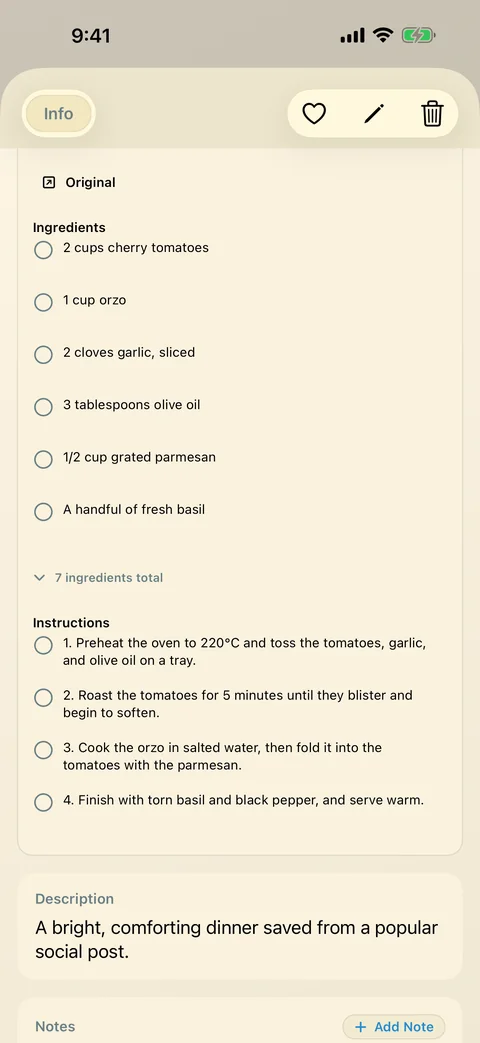
A recipe card needs a usable source
A complete recipe page is easier to extract than a video with no written amounts or instructions. Some supported videos provide enough caption or page information for a recipe card; others do not. If important ingredients or steps are missing, return to the original recipe.
Use the TikTok saving guide to save a recipe you found, or the extraction guide when a card is incomplete. Those are different jobs, so both guides remain available.
Keep recipes you will use again
Add a note about what you changed, a tag such as “weeknight,” and a favorite for recipes you want to repeat. Folders can group a collection. Check the recipe and any media while connected before cooking somewhere without reliable internet.
Free includes five Smart Cards. Premium removes that cap and adds folders. A recipe card does not promise a downloadable video or reliable extraction from every website.
Related guides
Download LinkBook