
Polymarket Smart Card
Polymarket smart card: track prediction markets faster in LinkBook (iOS)
Save Polymarket links with context, not just a URL. See outcomes, status, and movement at a glance, then open deeper metrics when you need them.
In this guide
- Why normal bookmarks lose prediction market context.
- How LinkBook Smart Cards keep key market signals visible.
- What you get in feed view vs detail view.
- How to track Polymarket links faster on iPhone.
Saving a Polymarket market is easy. Finding it later, with the odds, status, and context you cared about, is the hard part. Standard iPhone bookmarks remember a URL, not the story behind it. Days later you are reopening tabs just to answer basic questions: Which outcome was leading? Did it move in the last 24 hours? Is it still open?
LinkBook’s Polymarket smart card keeps that context attached to the link, so you can scan saved markets in seconds without opening every page.
Try LinkBook on iPhone
Install in 30 seconds, save your first link from Share Sheet, and see Smart Cards immediately.

The bookmarking problem: links without context
If you follow prediction markets, you save links for a reason: check back later, compare markets, or remember why you cared. But a normal bookmark is just a pointer. It does not show you the market’s state when you return.
So tracking becomes a loop:
- Open the link.
- Wait for the page to load.
- Find the numbers you care about.
- Repeat for every saved market.
When your list grows, friction wins and context disappears.
Smart Cards in LinkBook: a better way to save links
LinkBook is an iOS bookmark manager built for people who save a lot and revisit later. Smart Cards are how LinkBook closes the context gap.
Smart Cards enrich saved links with useful context inside LinkBook. Instead of a plain title and URL, your saved link can carry a snapshot of the information you typically have to reopen the page to see.
Smart Cards appear in two places:
- In your feed/list as a compact summary for fast scanning.
- In the link’s detail view as a richer breakdown when you need more.
Want the big picture of Smart Cards beyond Polymarket? See how Smart Cards work in LinkBook.
Polymarket smart card: a real-time odds summary inside LinkBook
If you save Polymarket links, you are usually trying to answer two questions:
- What does this market look like right now?
- What changed since I last checked?
The Polymarket Smart Card is designed to answer both without opening 10 tabs.
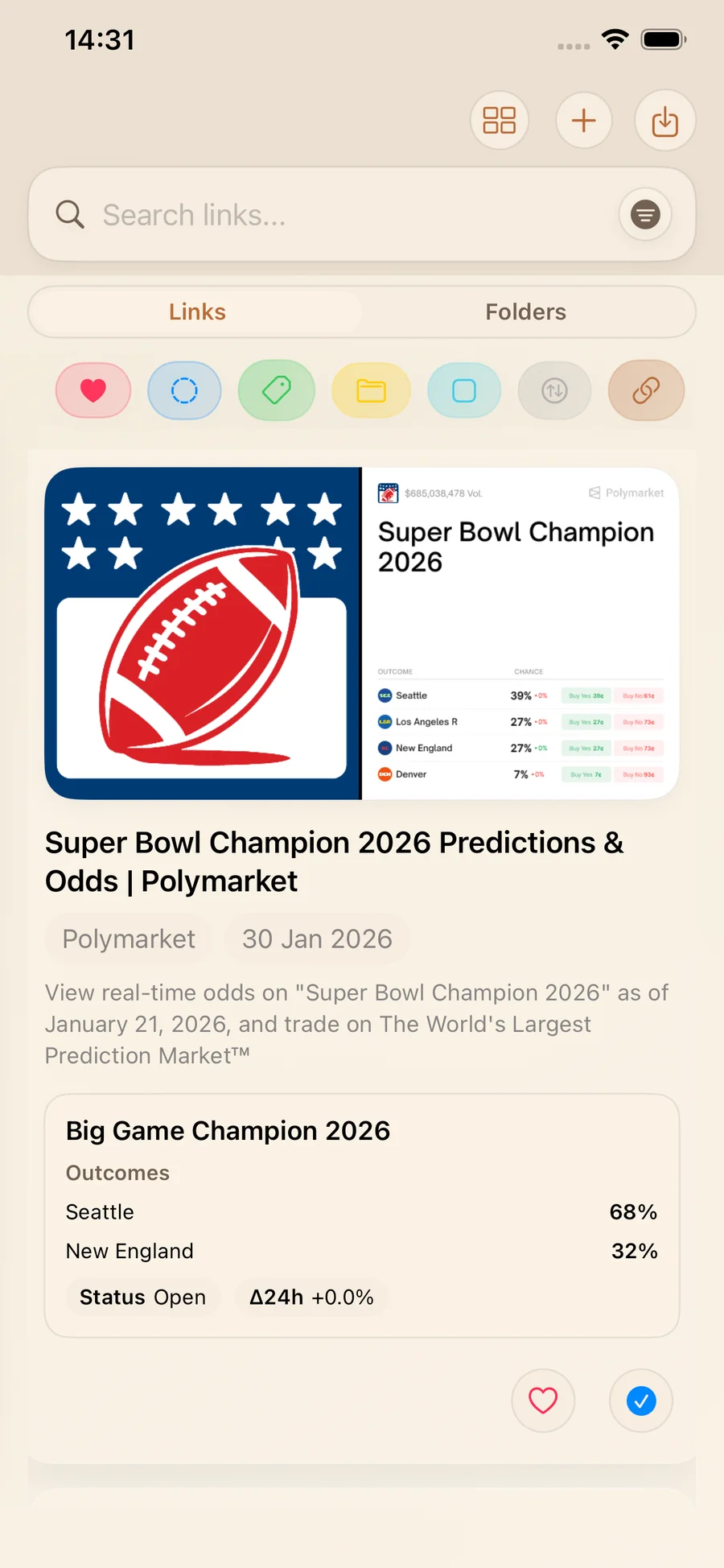
In the feed: scan outcomes, status, and Δ24h at a glance
In your LinkBook feed, the Polymarket Smart Card gives you a compact, scannable summary. It can show:
- Outcomes and percentages.
- Status (open/closed context).
- Δ24h movement.
This is the view you use when LinkBook is acting as your prediction market link tracker: quick checks, quick comparisons, fewer tabs.
In the detail view: deeper metrics + a 24h sparkline
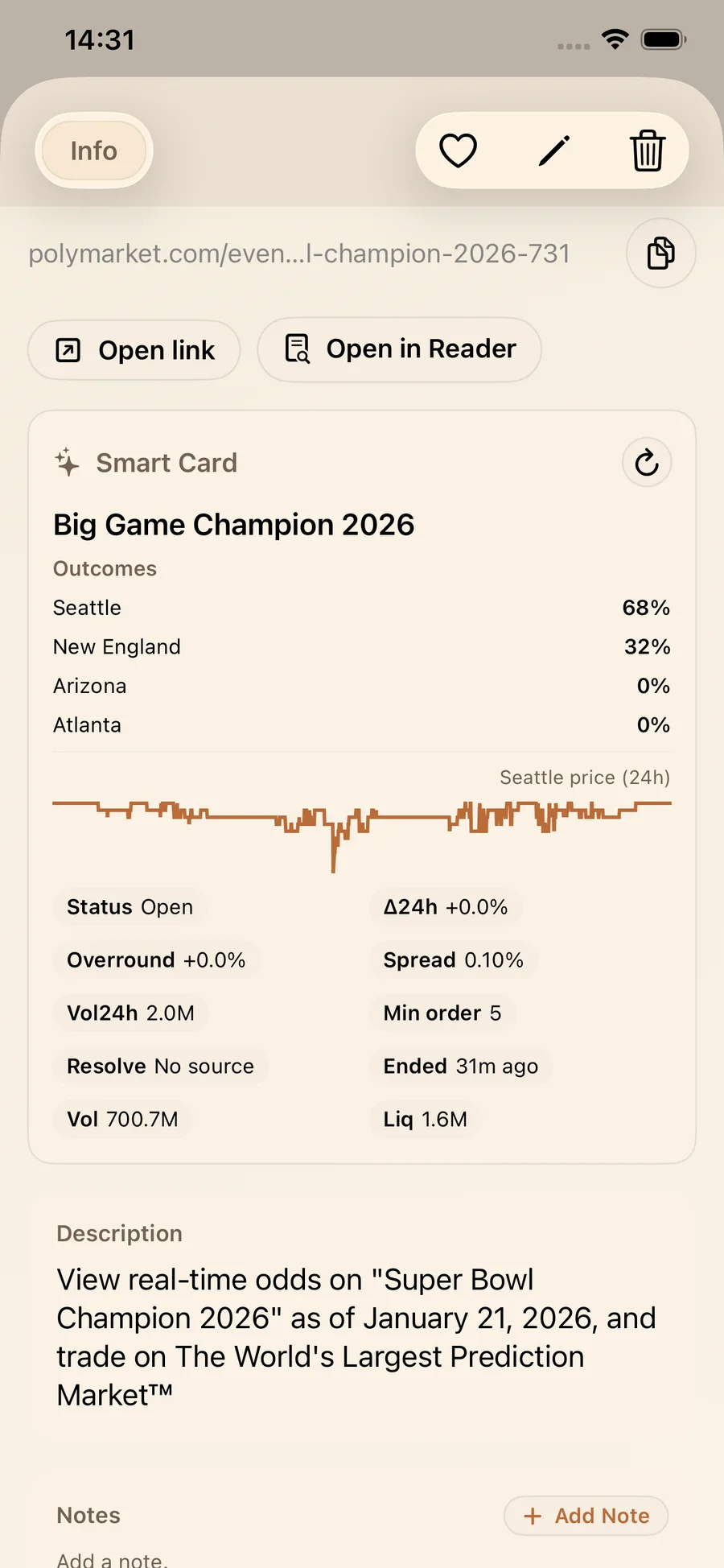
Open a saved Polymarket link and the Smart Card expands for deeper checks. Along with outcomes, percentages, status, and Δ24h movement, it can show:
- A 24h sparkline for the top-outcome price.
- Overround.
- Spread.
- Vol24h.
- Total volume.
- Liquidity.
- Minimum order size.
- Resolution-source presence.
- End timing (Ends/Ended relative time).
And when you want the original source, LinkBook keeps it close: Open link to jump to Polymarket, or Open in Reader to view the link in Reader. Reader mode in LinkBook keeps that workflow simple.
What these metrics help you do (in plain English)
You do not need to be a quant to get value from the Polymarket Smart Card:
- Outcomes and percentages answer what is leading immediately.
- Δ24h plus sparkline answer did this move and was it steady or jumpy.
- Volume (Vol24h + total volume) hints at whether a market is active or quiet.
- Liquidity plus spread hint at market depth and pricing tightness.
- Resolution-source presence plus end timing help you remember how the market resolves.
The goal is not to replace the market page. It is to give you enough context to decide whether it is worth opening.
Not financial advice: Smart Cards are for organizing and understanding information about your saved links. This is not investment or trading advice.
How to use the Polymarket Smart Card in LinkBook (mini guide)
A simple workflow:
- Find a market you want to track on Polymarket.
- Save the market link to LinkBook.
- In your Links feed, scan the Smart Card for outcomes, percentages, status, and Δ24h movement.
- Open detail view when you want sparkline plus deeper metrics like liquidity, spread, and volume.
- Tap Open link to view the original market on Polymarket.
- Tap Open in Reader to view the link in Reader.
New to LinkBook? Start with the iPhone save-links guide.
Why this is high-value vs normal bookmarks
Normal bookmarks are fine for I might need this later. They are not great for I need to track this.
Normal bookmarks
- Store a title and a URL.
- Force you to open the page to get the current state.
- Make comparing multiple markets slow.
LinkBook Smart Cards (Polymarket)
- Turn saved links into smart bookmark cards with embedded context.
- Surface outcomes, percentages, status, and Δ24h in the feed.
- Add deeper market metrics and a 24h sparkline in detail view.
- Keep Open link and Open in Reader close when you need the full page.
If you follow multiple markets at once, Smart Cards make your saved list usable, not just storable.
When a Polymarket Smart Card is most useful
A few common moments where the card saves time:
- Daily check-ins: scan saved markets quickly on iPhone.
- Fast comparisons: compare movement, liquidity, and volume side by side.
- Fewer dead ends: see status and end timing before opening the page.
Try LinkBook on iPhone
If you are tired of saving Polymarket markets and losing the plot later, try LinkBook. The Polymarket Smart Card turns your saved links into a quick snapshot so you spend less time reopening pages and more time staying oriented.
Download LinkBook on iPhone and start saving links with context on the App Store.
FAQ
What is a Polymarket smart card?
A Smart Card inside LinkBook that enriches a saved Polymarket link with outcomes and percentages, status, Δ24h movement, and deeper metrics in detail view.
Can I get an odds snapshot without opening Polymarket?
Yes. The card can show outcomes and percentages directly in LinkBook, with more in detail view.
What exactly can the Polymarket Smart Card show?
Outcomes and percentages, Δ24h movement, status, overround, spread, Vol24h, total volume, liquidity, minimum order size, resolution-source presence, end timing, and a 24h sparkline for the top-outcome price.
Is this financial advice or a trading tool?
No. It is an information and organization feature for saved links. Not financial advice.
Ready to build your link library?
Download LinkBook and start saving in seconds.