
TikTok Recipes
Save TikTok Recipes on iPhone and Turn Videos Into Organized Recipes
TikTok is great for discovering what to cook and terrible for cooking from later. LinkBook lets you save TikTok recipe videos, turn supported saves into written ingredients and steps, and keep everything organized so the recipe is still useful when you need it.
In this guide
- Why TikTok recipe videos are hard to use once the moment passes.
- How LinkBook turns supported TikTok saves into recipe cards with ingredients and steps.
- How ingredient checklists and Cook Mode reduce kitchen friction.
- How tags and saved analysis keep TikTok recipes organized.
The problem: TikTok recipes are easy to discover and hard to cook from later
A recipe video feels useful in the feed because everything is happening in one fast stream. The second you try to make it later, the format starts working against you.
- The ingredient list flashes by in overlays, captions, or comments.
- You pause and scrub the video over and over to rebuild the steps.
- Your likes and saved videos turn into one pile with no usable context.
- When you finally want to cook, you remember the dish but not the creator or the exact clip.
A saved TikTok alone is not a recipe workflow. What you really want is the original video plus a written version you can scan, search, and cook from.
Try LinkBook on iPhone
Install in 30 seconds, save your next TikTok recipe video, and see how Smart Cards make saved links usable.

The solution: bookmark the video, get a written recipe, keep it organized
LinkBook gives TikTok recipe videos a structure they usually do not have on their own. You save the video into LinkBook, keep the original source available, and for supported cooking videos LinkBook can write down the recipe into ingredients and steps you can actually use.
- Save the TikTok recipe video into LinkBook on iPhone.
- Keep the original TikTok video one tap away.
- View extracted ingredients and steps in a Recipe Smart Card when available.
- Tap ingredients as you prep and use Cook Mode when you are ready to cook.
- Save tags and analysis so the recipe stays easy to find later.
If you want the broader save-and-reopen TikTok workflow, read Save TikTok Videos and Watch TikTok Later on iPhone. If you want the recipe-focused product overview, see Recipe Smart Card: Save recipe links you can actually cook.
What this looks like inside LinkBook
The easiest way to understand the feature is to walk through the actual problem-solution flow: keep the original video, turn it into a readable recipe, and organize it for later.
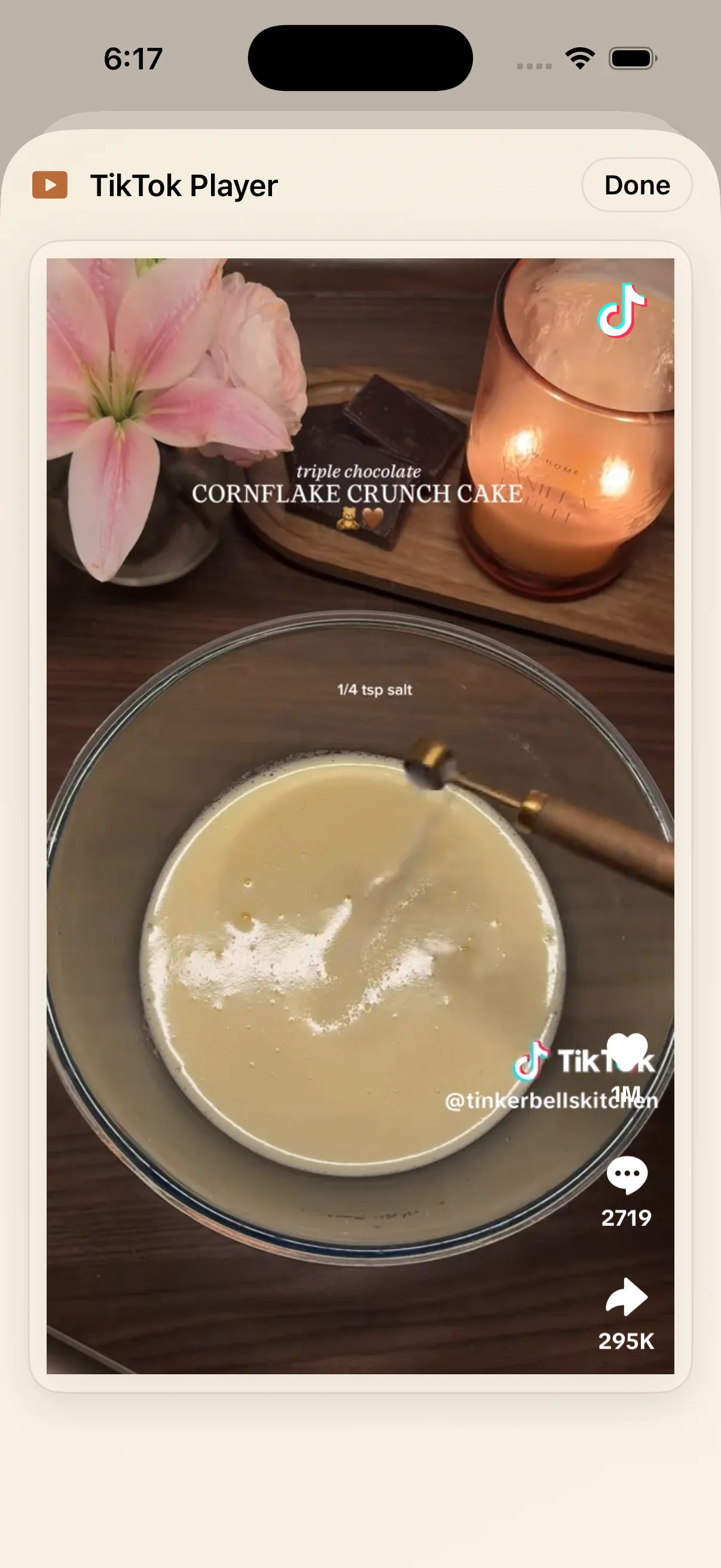
1) Keep the original TikTok video attached to the save
LinkBook does not strip away the source. The saved item still opens the original TikTok video, so you can rewatch the clip, confirm technique, or check the creator's presentation whenever you want.
2) Turn the TikTok into a structured recipe card
Instead of relying on overlays and comment threads, LinkBook can turn a supported TikTok cooking video into a Recipe Smart Card with a title, creator, ingredients, and steps in one place.
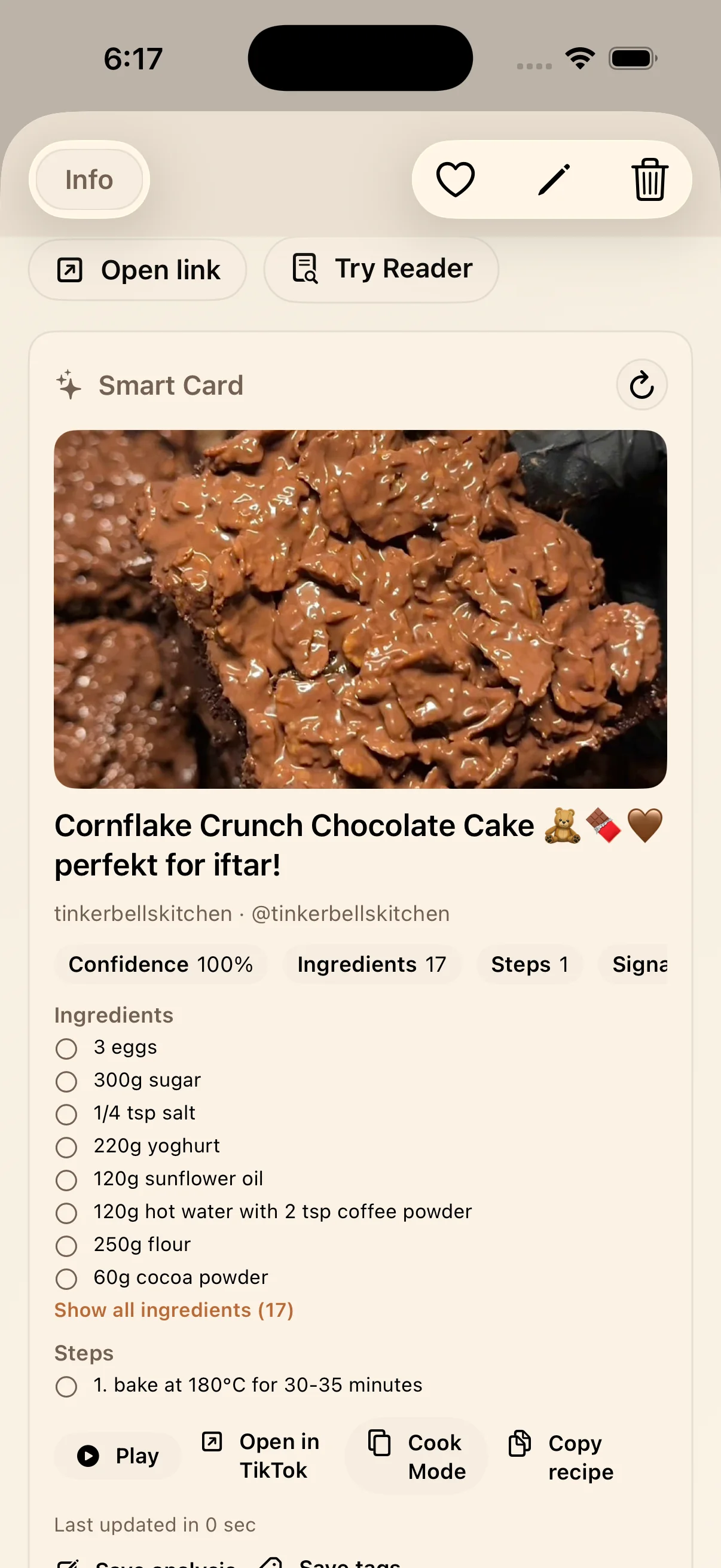
That is the core shift. A TikTok recipe stops being "a clip I hope I can reconstruct later" and becomes "a saved recipe I can actually use."
3) Cook from the card instead of a paused video
Once the recipe is structured, you can scan ingredient and step counts, open the original TikTok, jump into Cook Mode, or copy the recipe without losing context.
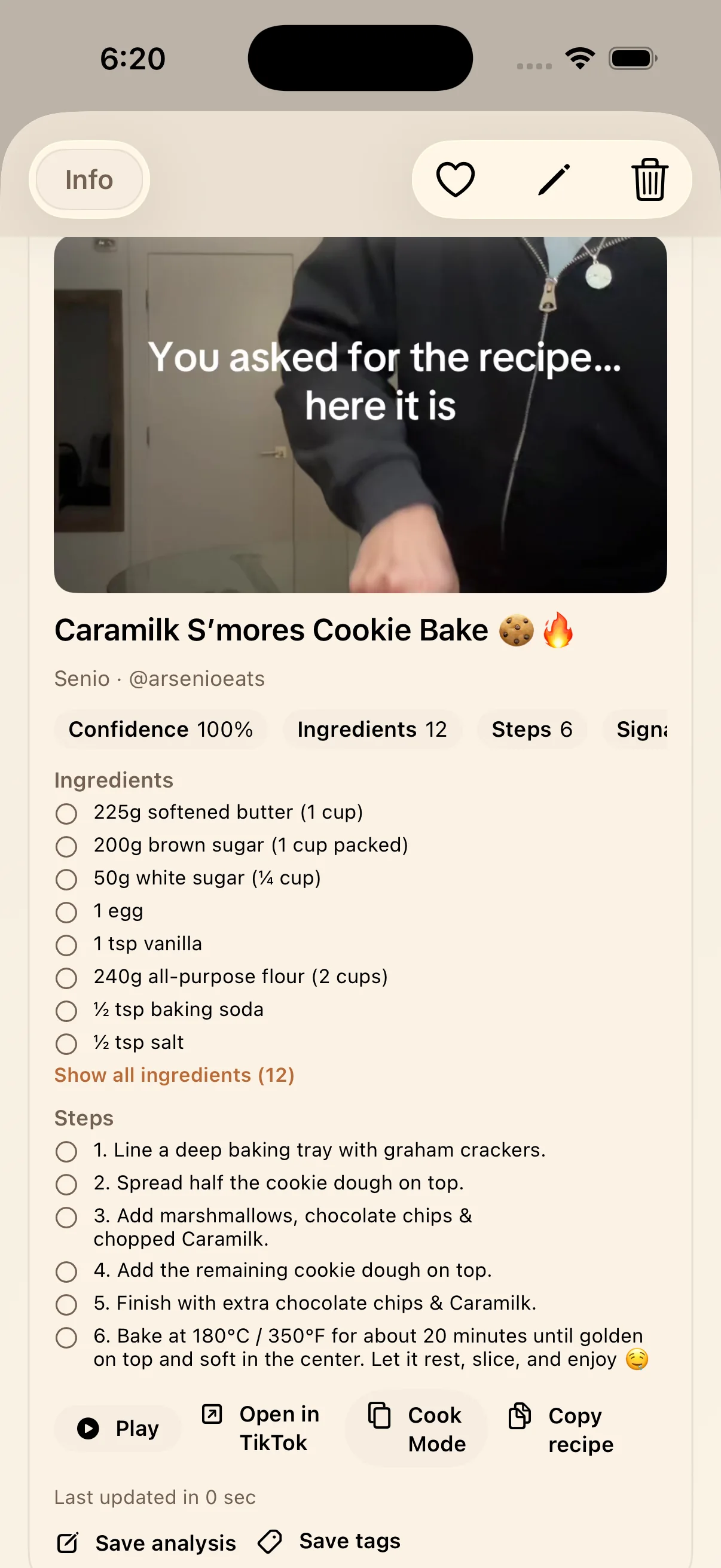
That single card reduces a lot of kitchen friction:
- You can scan what you need before starting.
- You can jump into Cook Mode when you want one step at a time.
- You can copy the written recipe without manually typing it yourself.
- You can save analysis or tags from the same screen for future retrieval.
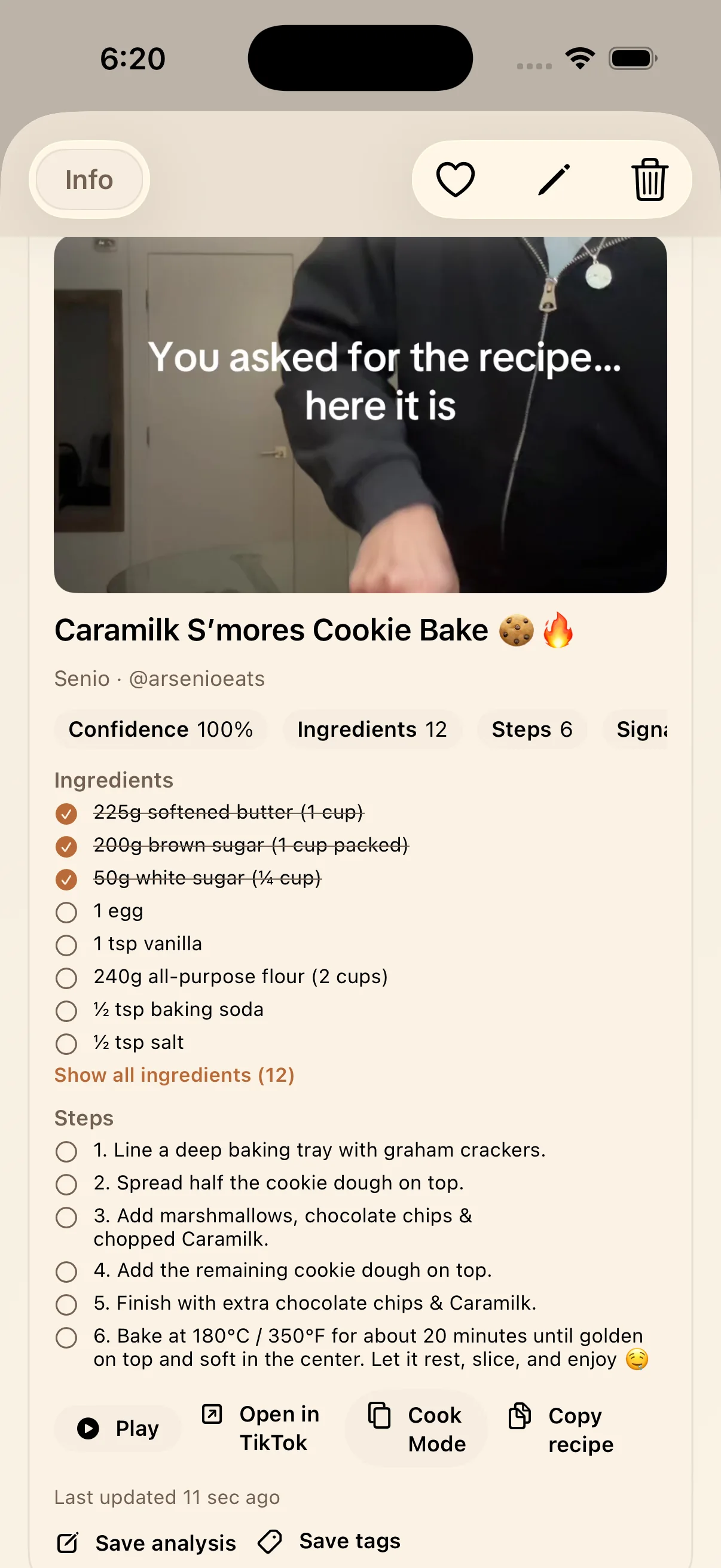
4) Check ingredients off while you prep
The ingredient checklist matters more than it sounds. Once you are cooking, not having to remember whether you already added sugar, vanilla, or flour is a real quality-of-life upgrade.
Why this works better than saving recipes inside TikTok alone
The useful part is written down
A saved video tells you where the recipe came from. A written recipe tells you how to make it. LinkBook can give you both in the same save.
The recipe becomes searchable
Once the recipe lives in LinkBook, you are not limited to remembering a creator name or scrolling through a feed of liked videos. You can search by dish, ingredient, tag, or saved context.
Organization survives algorithm chaos
TikTok is optimized for discovery, not personal organization. LinkBook gives recipe videos the structure TikTok itself does not: tags, folders, saved analysis, and a stable library you control.
How to organize TikTok recipes so you can actually find them later
The organizing step is what turns this from a nice demo into a usable system. A few practical habits go a long way:
- Tag by dish type: dessert, pasta, meal prep, high protein.
- Tag by use case: weeknight dinner, ramadan, hosting, try soon.
- Tag by creator if you repeatedly save from the same food accounts.
- Use folders for broader buckets like Dinner, Baking, or Favorites.
- Save analysis when you want a quick reminder of why the recipe was worth keeping.
This is where LinkBook starts behaving like a true TikTok recipe organizer, not just a place to stash links.
What to expect from different TikTok recipe videos
Not every cooking clip publishes recipe information equally clearly, so it helps to set the right expectation:
- Some supported TikTok recipe videos can become full cards with title, ingredients, steps, and actions.
- Some may show partial recipe information if the video is ambiguous or incomplete.
- Some can remain standard saved TikTok links that you can still reopen from LinkBook normally.
Even when a recipe is partial, keeping the source video and your own tags in one place still beats trying to remember which creator made "that one cornflake cake" two weeks later.
Ready to save your next TikTok recipe?
The next time a recipe video looks worth trying, use this workflow:
- Save the TikTok recipe video into LinkBook.
- Open the Recipe Smart Card if recipe details are available.
- Tag it so it stays findable.
- Use the written ingredients, steps, and Cook Mode when you are ready to make it.
If TikTok is already part of how you discover meals and desserts, this is the missing step that makes those saves useful later. Try LinkBook on the App Store and continue with Recipe Smart Card or Smart Cards for Saved Links for the broader workflow.
FAQ
How do I save a TikTok recipe on iPhone?
Save the TikTok recipe video link into LinkBook, then open it from your library. For supported recipe videos, LinkBook can also show a structured Recipe Smart Card.
Can LinkBook turn TikTok cooking videos into written recipes?
For supported TikTok recipe videos, yes. LinkBook can extract recipe information and present ingredients and steps in a cleaner, written layout.
Does LinkBook keep the original TikTok video too?
Yes. The saved item still keeps the original TikTok video available, so you can rewatch the source clip while using the written recipe card.
How can I organize TikTok recipes in LinkBook?
Use tags, folders, search, and saved analysis. That gives each recipe context, which is what generic saved video lists usually lack.
Does every TikTok recipe video become a full recipe card?
Not always. Some supported videos can become full cards, some may be partial, and some remain standard saved TikTok links if recipe details are unavailable.
Can I check off ingredients while cooking?
Yes. When a TikTok recipe is available as a Recipe Smart Card in LinkBook, you can tap ingredients as you prep and use Cook Mode for a more focused cooking flow.
Ready to build your link library?
Download LinkBook and start saving in seconds.