
TikTok Recipe Extractor
TikTok Recipe Extractor for iPhone: Share a TikTok Link and Get Ingredients + Steps
If you keep saving TikTok cooking videos and losing the usable part, the missing piece is structure. LinkBook lets you share or save a TikTok recipe link on iPhone and, for supported videos, turns that save into a recipe card with ingredients, steps, Cook Mode, and tags.
In this guide
- What a TikTok recipe extractor should actually solve.
- How to extract a recipe from a TikTok link on iPhone with LinkBook.
- What LinkBook pulls into the saved recipe card.
- Why this works better than a generic saved-video list inside TikTok.
What a TikTok recipe extractor needs to fix
TikTok is great at helping you discover what to cook next. It is much worse at helping you actually cook it later. Measurements can sit in the caption, overlays, or comments. Steps move too fast. A week later, you remember the dish but not the exact creator or clip.
That is why a real TikTok recipe extractor should do more than bookmark a video. It should let you save the source, pull the recipe details into a readable format, and keep everything organized so the recipe is still useful when you get to the kitchen.
- Keep the original TikTok link attached to the save.
- Surface ingredients and steps when recipe details are available.
- Let you cook from the saved result instead of a paused video.
- Keep the recipe searchable with tags, saved analysis, and library context.
Try LinkBook on iPhone
Install LinkBook, share your next TikTok recipe link, and turn supported saves into a recipe card you can use.

How to extract a recipe from a TikTok link on iPhone
LinkBook is built around the save flow, not around manual copy-paste busywork. The path is simple:
- Open the TikTok recipe video and use the iPhone share sheet or Copy Link.
- Save that TikTok URL into LinkBook.
- Open the saved item in your library.
- For supported recipe videos, LinkBook upgrades the save into a TikTok Recipe card.
Under the hood, LinkBook cleans the TikTok URL, keeps the original source attached, and checks the save for recipe structure. When the video looks like a recipe, the app can promote it from a normal TikTok save into a more useful recipe format.
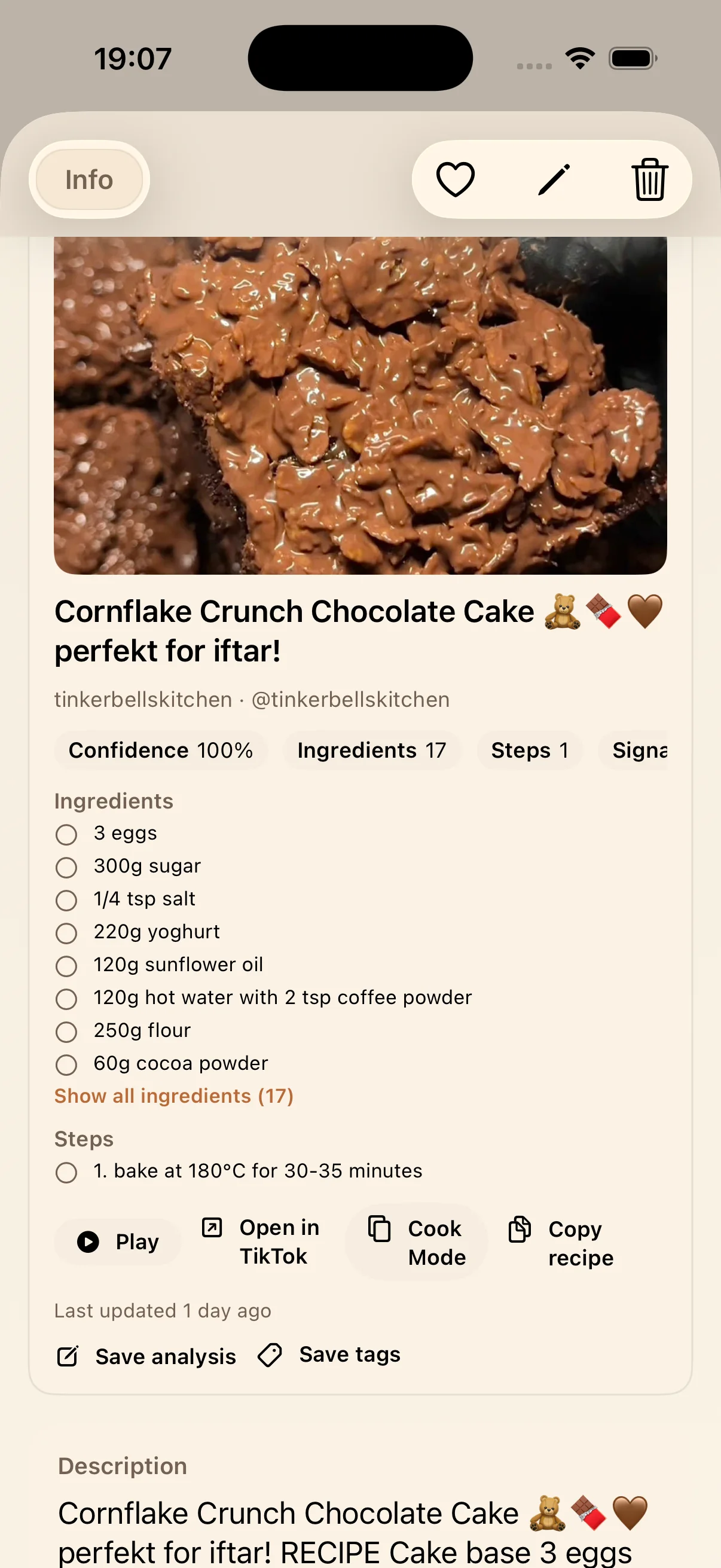
What LinkBook extracts from supported TikTok recipe links
The point is not to strip away TikTok. The point is to make the saved link usable. For supported recipe saves, LinkBook can turn one shared TikTok link into a card that is easier to scan, search, and cook from.
- A recipe title or a cleaner recipe-oriented label for the save.
- An ingredient list you can scan before shopping or prepping.
- Step text you can read without scrubbing the video again and again.
- A confidence indicator so you know when to double-check quantities.
- One-tap actions for Play, Open in TikTok, Cook Mode, and Copy recipe.
- Save analysis and Save tags actions so the recipe stays organized inside your library.
LinkBook reads the saved TikTok through a recipe-oriented smart-card workflow. In practice, that means the app looks for recipe signals in the saved video metadata and preview content, then tries to present the result in a cooking-friendly structure instead of a generic link card.
Why this works better than saving TikTok recipes inside TikTok alone
You keep the source video and the written recipe together
A normal save tells you where the idea came from. A recipe card tells you how to make it. LinkBook keeps both on the same saved item.
The recipe becomes easier to cook from
When ingredients and steps are visible, you can stop using pause, rewind, and memory as your cooking workflow. That is where a TikTok recipe app becomes genuinely useful, especially on busy weeknights or when you are juggling prep in a small kitchen.
The save stays organized later
LinkBook is also a recipe organizer. Once the TikTok link is saved, you can add tags, save analysis, search your library, and keep recipes grouped by dish type, creator, or occasion instead of buried in a single saved-video feed.
How LinkBook decides when a TikTok link is a recipe
Not every TikTok link should become a recipe card. LinkBook first saves the original TikTok item, then looks for recipe intent and structure before showing the richer recipe view.
- Some supported TikTok cooking links become full recipe cards with ingredients and steps.
- Some may be partial if the recipe details are incomplete or unclear.
- Some remain standard saved TikTok links that you can still reopen normally.
That is the right tradeoff for a feature like this: the app tries to extract the useful recipe parts without pretending every short-form cooking video has a clean, complete recipe baked into it.
Best use cases for a TikTok recipe extractor
This workflow is especially useful if you often save cooking links for later but do not want to rebuild the recipe by hand when it is time to cook.
- Desserts and baking clips with ingredient overlays.
- Quick dinner ideas you want to revisit after work.
- Meal prep or high-protein recipes you save in batches.
- Holiday or Ramadan recipes you want tagged for seasonal reuse.
- Creator-specific collections you want in one searchable library.
If this is your use case, continue with Save TikTok Recipes on iPhone for the broader organizer angle, or see Recipe Smart Card for the larger product story behind saved recipe links.
Ready to save your next TikTok recipe link?
If you have been searching for a way to extract a recipe from a TikTok link without manually rewriting the whole thing, LinkBook is the cleanest version of that workflow on iPhone.
- Share or copy the TikTok recipe link.
- Save it into LinkBook.
- Open the recipe card when ingredients and steps are available.
- Use Cook Mode, Copy recipe, tags, and analysis to make the save useful later.
Download LinkBook on the App Store and keep reading with Save TikTok Videos and Watch Later or Smart Cards for Saved Links.
FAQ
What is a TikTok recipe extractor?
It is a tool that takes a TikTok cooking link and turns the usable parts into a cleaner recipe format. In LinkBook, supported TikTok recipe saves can show ingredients, steps, and cooking actions.
How do I extract a recipe from a TikTok link on iPhone?
Share or copy the TikTok link into LinkBook and save it. For supported recipe videos, LinkBook can promote the saved TikTok into a TikTok Recipe card with ingredients and steps.
Does LinkBook keep the original TikTok video?
Yes. The saved item still keeps the source video available, so you can reopen TikTok whenever you want to review the original clip.
What does LinkBook extract from a TikTok recipe?
Supported recipe saves can include a recipe title, ingredients, steps, a confidence indicator, and actions like Open in TikTok, Cook Mode, Copy recipe, Save analysis, and Save tags.
Does every TikTok cooking video become a full recipe card?
No. Some videos become full recipe cards, some may be partial, and some remain normal saved TikTok links when the available recipe details are not clear enough.
Can I use the saved recipe while cooking?
Yes. When recipe details are available, you can review ingredients, follow steps, copy the recipe, and use Cook Mode for a cleaner step-by-step flow.
Ready to build your link library?
Download LinkBook and start saving in seconds.